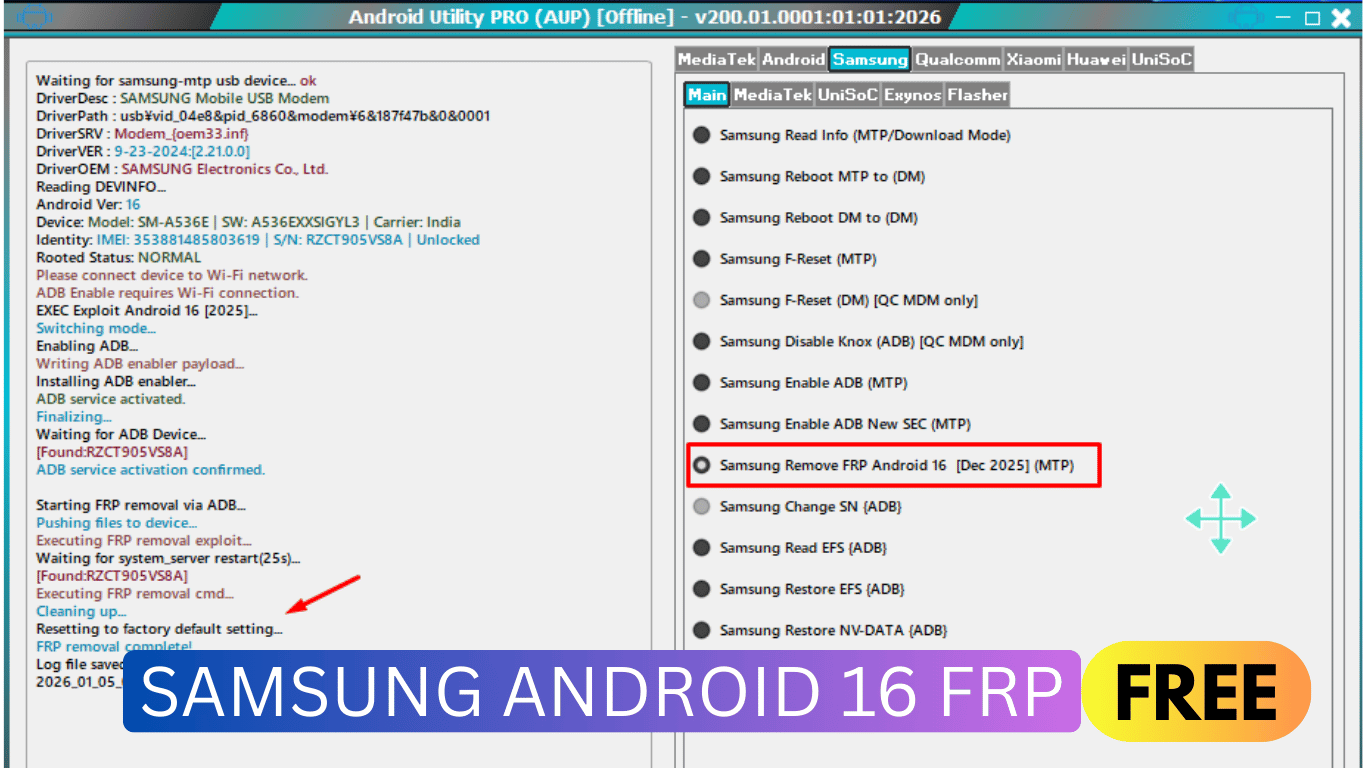
Samsung Factory Reset Protection (FRP) has become one of the strongest mobile security systems in recent years. Its main purpose is to protect user data after a factory reset by requiring the previously synced Google account. While this is good for security, it often creates serious problems for legitimate users who forget their Google account details or purchase second-hand Samsung devices.
For a long time, Samsung has continuously improved its security patches and successfully blocked all free FRP bypass methods on Android 13, Android 14, and Android 15. During that period, the only working solution was IMEI-based paid services, which were expensive and not always available. Recently, even IMEI FRP services have stopped working or gone offline in many regions.
However, in 2026, a breakthrough has arrived.
A new update in Android Utility Tool now allows users to unlock Samsung Android 16 FRP completely FREE, without any credits, paid servers, or IMEI submission. This method works with a single click, making it one of the easiest FRP solutions ever released.
What Is Android Utility Tool?
Android Utility Tool (AUT / AUP) is a powerful multi-brand Android servicing tool designed for technicians as well as beginners. It supports Samsung, MediaTek, Qualcomm, UniSoc, Xiaomi, Huawei, and more.
With the latest v2026 update, the tool introduces a dedicated option:
Samsung Remove FRP Android 16 [Dec 2025] (MTP)
This option allows full FRP removal on Samsung Android 16 devices without payment, without flashing, and without complex steps.
Why This Tool Is a Game Changer for Samsung FRP
Previously:
- Android 13 / 14 / 15 FRP bypass ❌ Blocked
- IMEI FRP services ❌ Expensive & mostly offline
- Free tools ❌ Not working
Now with Android Utility Tool:
- Android 16 FRP removal ✅ Working
- 100% FREE method ✅
- One-click process ✅
- Beginner-friendly ✅
This makes it one of the best Samsung FRP solutions of 2026.
Key Features of Android Utility Tool (Samsung Section Explained)
Below are the main Samsung options visible in the tool and what they do:
🔹 Samsung Read Info (MTP / Download Mode)
Reads device details such as model, Android version, IMEI, and status. Useful for verifying the phone before unlocking.
🔹 Samsung Reboot MTP to DM / DM to MTP
Switches device modes automatically. This is important for enabling debugging and executing system commands.
🔹 Samsung F-Reset (MTP)
Performs a factory reset through MTP mode. Helpful when the device is stuck after setup issues.
🔹 Samsung Enable ADB (MTP)
Enables ADB access on locked devices using a secure exploit. This step is essential for FRP removal.
🔹 Samsung Enable ADB New SEC (MTP)
A newer method designed for updated Samsung security patches on Android 16.
🔥 Samsung Remove FRP Android 16 [Dec 2025] (MTP)
✅ The most important option
- Removes Google FRP lock
- No IMEI required
- No paid credits
- Works via ADB + MTP
- Fully automatic
- One-click execution
🔹 Samsung Read / Restore EFS (ADB)
Advanced options are mainly for technicians to back up or restore device network data.
Supported Devices & Requirements
Requirements:
- Samsung device running Android 16
- USB cable
- Windows PC
- Internet connection (Wi-Fi required on phone)
- MTP mode enabled
Supported:
- Most Samsung Android 16 models
- Exynos / Qualcomm variants
- No carrier restriction
Step-by-Step FRP Unlock Process (Beginner Friendly)
- Connect the Samsung phone to the PC in MTP mode
- Open Android Utility Tool
- Go to Samsung → Main
- Click Samsung Remove FRP Android 16 (MTP)
- The tool enables ADB automatically
- FRP removal process starts
- Device resets settings
- FRP Lock Removed Successfully
No flashing. No risk. No payment.
Why This Is the Best Samsung Android 16 FRP Solution in 2026
✔ Completely FREE
✔ No IMEI submission
✔ No server dependency
✔ One-click solution
✔ Works on the latest security patch
✔ Suitable for beginners & professionals
Compared to paid IMEI services and risky online tricks, Android Utility Tool provides the safest and most reliable solution for Samsung Android 16 FRP unlock.
Final Thoughts
If you are searching for a working Samsung Android 16 FRP unlock free method in 2026, then Android Utility Tool is currently the best solution available.
It breaks the long-standing limitation created by Samsung security updates and brings back a true free FRP bypass, something the GSM community has been waiting for years.
Highly recommended for:
- Mobile technicians
- GSM software users
- Second-hand phone buyers
- Beginners looking for an easy solution
Download Android Utility Tool (Free)
👉 Download Link: Android Utility Tool
Password: mfdl
⚠️ Use responsibly and only on devices you own or have permission to service.
